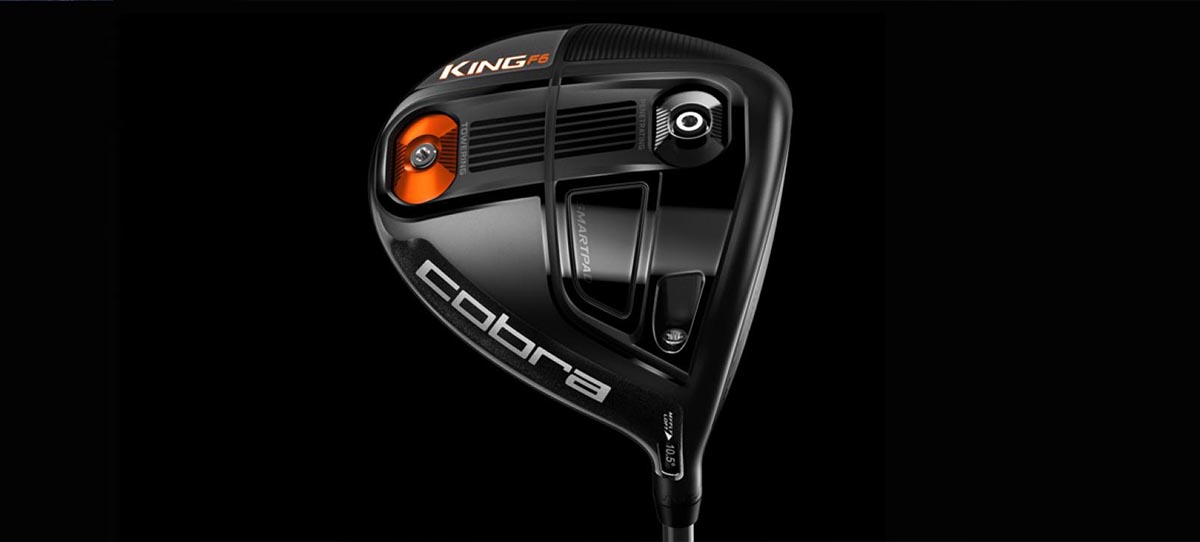
The King Cobra K7 may look like an ordinary driver but it is in fact one of a new breed of smart clubs that aim to automate distance tracking.
Up until now, golfers wanting to accurately measure the distance of their shots have had to buy bespoke accessories such as the Garmin Golf Watch or Arccos Sensor. However, with the K7, all you need to do is sync up your smartphone with the club, select the course and tee off. Is this the future of golf?
The King Cobra K7 lived up to the high standards I expected from one of the biggest brand names in golf. Design-wise, the driver looked great with its glossy black finish on the front complemented by a splash of orange on the rear. The word 'Cobra' was conveniently placed on the front to help line up the ball with the giant sweet spot at address.
With a 63g regular shaft, the K7 had great overall weight balance and it also offered all the adjustability I expected from the latest drivers on the market.
However, I did experiment with the three different centre of gravity settings. I tried the heaviest 12g weight in each of the different positions — front, back and on the heel. My personal preference was having the 12g weight in the back position, as this helped me to increase trajectory and achieve a nice right-to-left (draw) ball flight.
I had some initial concerns about the durability of the sensor, though. As anyone who plays golf knows, clubs are bashed about regularly, especially when they are put into a bag. However, Cobra confirmed that the sensor is submerged deep enough into the grip to withstand rough usage. The only thing that is exposed to the elements is the light sensor.
Having tested a range of golf sensors and accessories, I can confidently say that this was by far the easiest product I have set up to date. All I had to do was download the Arccos Driver app and switch on Bluetooth on my smartphone.
The Arccos app is available on Android and iOS, and I used it on my iPhone 6S Plus during testing. Setting up consisted of three steps; creating an account, syncing the driver and downloading relevant course information. In total, this process took between 5 - 10 minutes.
After the download I was presented with two options — sync an Arccos accessory or the King Cobra K7 driver. I chose the latter and the devices paired up in seconds. Unlike some other products on the market, this sync only had to be performed once. Every subsequent time I opened the app, it automatically detected the driver and was ready to go.
The first question I was consistently asked when telling friends that the K7 driver was able to track ball distance was: "How does that work?" Almost everyone seemed made an assumption that I was using a ball with a sensor embedded into it, which made the K7 sound all the more impressive when I explained how it worked.
The tracking system in the K7 is ingenious as it uses the sensor in the club combined with the microphone in my smartphone. When I hit my tee shot, the microphone in my smartphone 'heard' the impact and registered it as a drive. At this point all I had to do was tuck my driver back into the bag and walk up to where I hit the ball.
When I hit my second shot, the microphone again detected that the ball had moved and then automatically calculated the distance I hit from the tee and displayed it in graphical format.
The app is broken down into four main sections. There's 'Cobra', which provides a variety of tutorials; 'Player', which gives an overview of your handicap; 'Rounds' where you deep dive into individual rounds; and finally, 'Start Round' that lets you begin a new round. It's all smartly laid out.
Before each round the app reminded me to keep the phone in my front pocket so that the Bluetooth connection was in range to register shots. One of the best things about having the app rely on sound as well as motion was the fact that it meant practice swings were never registered as a hit.
This was a problem I had previously had with watch-based golf sensors that relied solely on accelerometers. After hitting a drive I found myself having a quick glance at my phone to check it had been registered. If you find it hasn't picked up the drive you can add it manually, although in multiple rounds of golf, I never needed to make any manual interventions and the microphone method worked a treat.